Last Updated on April 24, 2026 by Deon
For traders, understanding economic news is just as important as reading charts. Forex Factory provides one of the most popular economic calendars in the trading world. However, simply looking at the news isn’t enough—you need to know how to interpret Forex Factory news.
This guide will help you understand how to read and use Forex Factory news like a trader.
What Is Forex Factory News?
Forex Factory news refers to the calendar and data releases listed on the platform. These include:
* Interest rate decisions
* Inflation reports
* Employment data
* GDP growth figures
Each of these Forex Factory events can significantly impact currency prices.
Understanding the Economic Calendar Layout
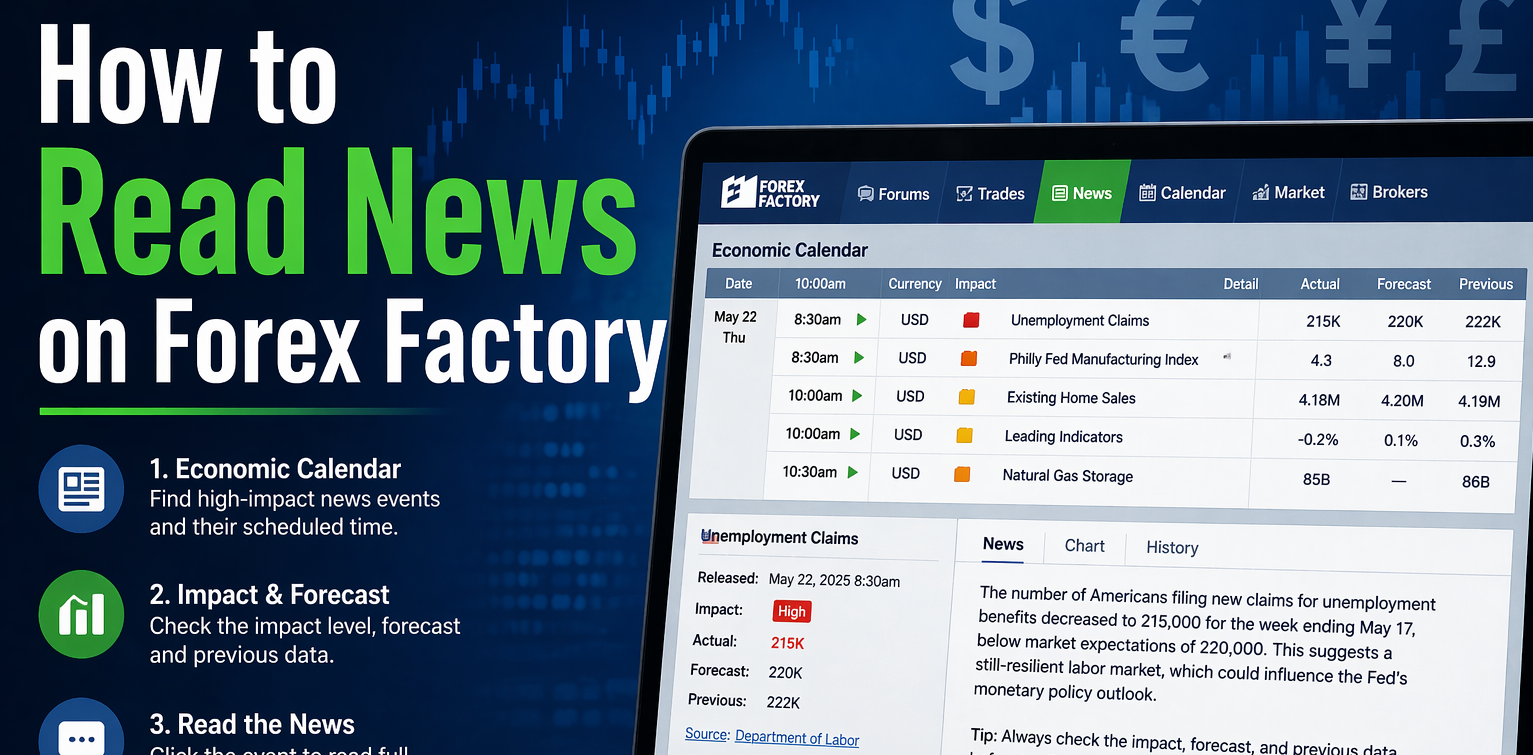
When you open the calendar on Forex Factory, you’ll see columns. Here’s what each means:
1. Time
Shows when the news will be released based on your selected time zone.
2. Currency
Indicates which currency will be affected. For example, USD, EUR, or GBP.
3. Impact Level
Represented by icons:
High Impact
Medium Impact
Low Impact
Focus mainly on high-impact news events on Forex Factory.
4. Event Name
Describes the event. For example, Non-Farm Payrolls.
5. Actual Forecast, Previous
These are the important numbers on Forex Factory:
Actual → The real released data
Forecast → Market expectation
Previous → Last reported value
How to Interpret Forex Factory Data
Reading the numbers correctly is key to making trading decisions with Forex Factory news.
Actual vs Forecast
If Actual > Forecast → Currency may strengthen
If Actual < Forecast → Currency may weaken
For example, if U.S. Employment data comes out better than expected, the USD often rises on Forex Factory.
Importance of High-Impact News on Forex Factory
High-impact events on Forex Factory can cause:
price spikes
Increased volatility
Slippage and spread widening
Traders often either:
Trade the news
Avoid trading during news
Using Filters for Better Focus on Forex Factory
Forex Factory allows you to filter news based on:
Impact level
Currency
Session timing
This helps you avoid information and focus only on relevant Forex Factory events.
Reading News Details on Forex Factory
Clicking on an event opens information on Forex Factory, including:
Explanation of the indicator
Why it matters to the economy
Historical data charts
This is useful for beginners trying to understand market fundamentals with Forex Factory.
Best Practices for Beginners
1. Focus on Major Currencies
Start with USD, EUR, and GBP news on Forex Factory.
2. Avoid Overtrading
Don’t trade every news event on Forex Factory—wait for high-quality setups.
3. Combine with Technical Analysis
News isn’t enough. Use charts to confirm entries with Forex Factory.
4. Check Timing
Always ensure your time zone is set correctly to avoid missing key events on Forex Factory.
Common Mistakes to Avoid on Forex Factory
Ignoring forecast data
Trading during volatility without a strategy
Not understanding the event before trading
Forgetting time zone differences
Final Thoughts on Forex Factory
Reading news on Forex Factory is a powerful skill that can significantly improve your trading performance. By understanding the calendar, interpreting data correctly, and focusing on high-impact events on Forex Factory, you can make informed and confident trading decisions.
Mastering this skill takes time. Once you do, you’ll have a strong edge in the forex market with Forex Factory.